Fleet Closed Beta

The right vehicle belongs in the plan.

Keep vehicles with their training categories, odometer readings and equipment. Where suitable lesson data exists, consumption and estimated costs add context to the vehicle record.

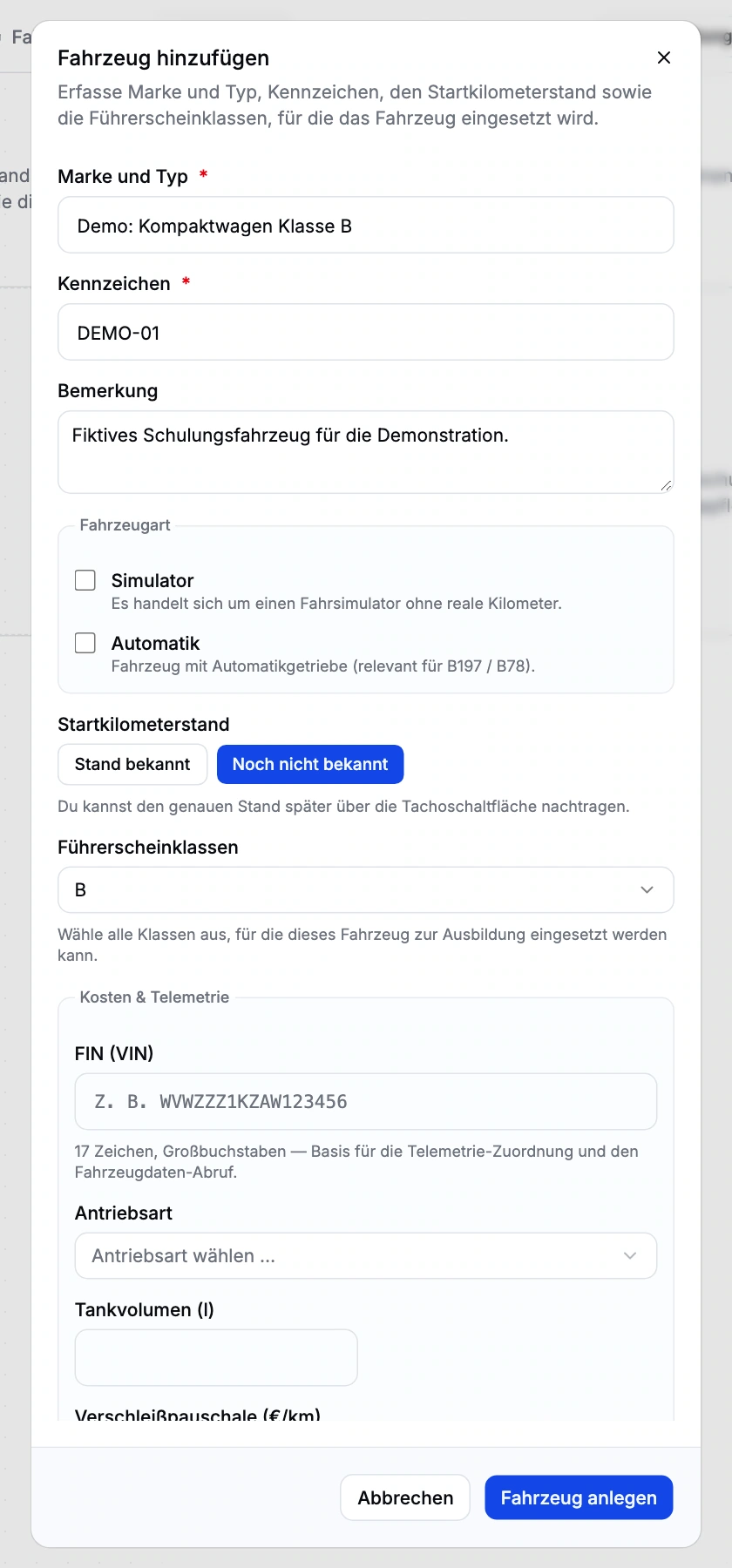
Manual vehicle form with a fictional demo vehicle, training category and vehicle details. Enlarge view (new tab)
Closed beta demo view. Fictional vehicle; not saved. No real VIN or telemetry history. The original product interface is shown in German.

Maintain vehicle records and training assignments

Vehicle records for training

Brand and model, registration, categories, automatic transmission or simulator status, images and assistance systems describe the vehicle. Manual creation works without a VIN lookup; VIN-assisted creation can prefill available vehicle data.

Follow odometer readings

Starting and current odometer readings are stored separately, preserving the context of use within your fleet. Unknown values remain unknown rather than being treated as reliable measurements.

A calendar resource

Vehicles can be assigned to appointments and included in resource views. Scheduling can then account for the intended training vehicle as well as instructor and student.

Consumption and fault codes in context

Suitable OBD/lesson data provides telemetry, DTC summaries and consumption. Estimated lesson costs combine consumption, reference prices and a wear allowance. This is a calculation from available data, not a measured full-cost account.

From vehicle records to scheduled lessons

  1. Create

    Add the vehicle manually or using available VIN data.

  2. Assign categories

    Record licence categories, equipment and odometer readings.

  3. Schedule

    Assign the appropriate vehicle to the lesson.

  4. Review data

    Review consumption, DTC and cost estimates where suitable telemetry exists.

Check data for telemetry and cost estimates

Telemetry and cost estimates require suitable lesson data and setup. Automatic maintenance or vehicle-inspection reminders are currently unavailable. The demo contains no telemetry history.

Explore vehicle costs and fault codes

Questions about vehicles and lesson data

Does adding a vehicle require an OBD adapter?

No. Vehicle details and training categories can be managed manually. Telemetry and related analysis require suitable OBD/lesson data.

Are there automatic maintenance or inspection reminders?

Not currently. You maintain vehicle details and mileage and assign vehicles to appointments. Consumption and cost summaries require suitable lesson data.

How do we get access?

Driving school management is in closed beta. Tell us about your school and workflows. We will discuss whether the scope, setup and access fit your school. Applying does not confirm admission or activate access.

What access does our office team need?

Anyone working in the driving school management interface currently needs full school administration access. Finer office roles are not available yet. We plan responsibilities and access with you during onboarding.

How do you assign vehicles to lessons?

Driving school management is in closed beta. Tell us about your school and workflows. We will discuss whether the scope, setup and access fit your school. Applying does not confirm admission or activate access.