Put feedback in context
Entries are categorised as information, mistakes or risks. Log descriptions explain the recorded topic. Available location, time and speed data help connect it to the specific driving situation.
The mistake log makes recorded situations understandable: with a label, explanation, time and severity. After the lesson, you have more than a vague impression.
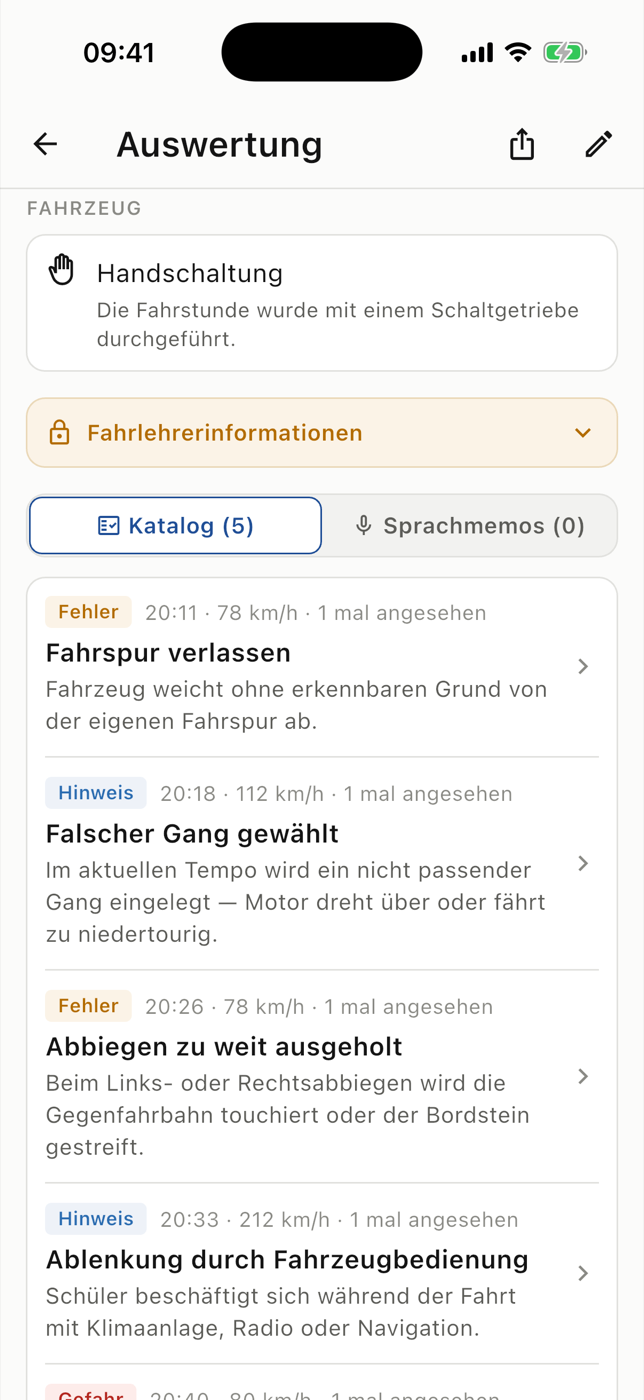
Not every piece of feedback means the same thing. An informational note, a mistake and a dangerous situation need different context. RoadReview keeps that distinction visible within the recorded lesson.
Entries are categorised as information, mistakes or risks. Log descriptions explain the recorded topic. Available location, time and speed data help connect it to the specific driving situation.
The instructor can check and adjust recorded situations before completing the lesson. The documentation remains their professional assessment. The app does not independently detect every driving mistake.
When a topic appears across several lessons, you can return to it deliberately. Students can read the explanation, see the location and ask questions. This provides a concrete starting point for the next exercise.
Three steps
Open the lesson’s mistake list.
Read the description and severity, and check available media.
Bring the topic into your next lesson with the instructor.
The list contains recorded situations. A low number of entries does not automatically mean a mistake-free lesson; frequency and severity need to be read in the context of the exercises.
Students use RoadReview through a participating driving school. New schools can register their interest; the enquiry does not automatically activate access.
Entries are based on the instructor’s documentation. Automatic detection of all driving mistakes is not promised.
Severity gives context to the recorded situation. It helps with discussion and priorities; the professional assessment remains with the instructor.
You can open the map for available GPS markers. Street imagery may add context where it is available.
Ask whether your driving school uses RoadReview. Access is provided through the participating school. You can send an enquiry to recommend RoadReview to your school.